詳情參照上篇
自修練功 大雜燴 委派 x 多層式架構 x 介面UI

定番 華而不實 五專案

IAccessType.vb

Form1.vb

TSQL.vb

TypedDataSet.vb

LINQ.vb

詳情參照上篇
自修練功 大雜燴 委派 x 多層式架構 x 介面UI
定番 華而不實 五專案
IAccessType.vb
Form1.vb
TSQL.vb
TypedDataSet.vb
LINQ.vb
吃飽太閒 把之前的練習 翻寫成VB
結果卡關在 classlibrary 中使用 connectionStrings
怎麼寫都是 Null Reference
查了一下 發現比想像中麻煩 算了 先擱著
反倒是VB LINQ 的浪打被我胡亂try出寫法 好爽
這種 集抽象 極簡 於一身 令人蛋疼又糾結的寫法 我最愛了
哪天有閒 再把各種查詢方式玩一遍吧
C#

VB.NET

如果只是想要打發笅剋扈速度交差了事的話,下面可以都不用看
如果跟我一樣無聊,沒事喜歡亂搞實驗的話就看吧。
基本上就是把最近學摸索的委派(還在持續摸索中)跟偉大的願景 - 寫一個多層架構的 符合物件導向概念的 偉大的應用程式 做結合
偉大的願景就跟崇高的理想一樣,輕易的就會被現實的專案時程打敗
但是對於一個燃燒摳頂小宇宙的PG來說,它還是散發著耀眼的光芒
以上廢話
UI很簡單長這樣

有五個專案看起來很強大,實際上不會有人這麼幹,但是可以作夢當作不同團隊開發各自的專案再整合

DatabaseAccessLayer 的 介面 IAccessType 定義所有資料存取的方法
類別 TSQL、TypedDataSet、LINQ 都繼承 IAccessType 各自所屬一個專案
這裡可以做夢當作不同團隊都用不同的方式存取資料庫,但是都必須遵守 介面 IAccessType 實作所有屬性方法事件
在程式需要存取資料庫的時候透過 繼承 IAccessType 的物件,來叫用方法取得資料
只是這次的練習很簡陋,所以沒有邏輯層

這次另一個練習重點是委派,分別使用了3種不同的委派寫法
radioButton的選擇決定使用何種委派方法,進而建立負責存取資料庫的物件的實例
或許這看起來很多此一舉,直接在判斷後面把類別指定給物件就好了,根本不必這麼麻煩
這裡可以做夢假設切換的條件是未知的,在某些特殊的情況下才切換,且發生的時機未知而不固定
由於未知且不定,很難明確的靠判斷式來取得實例,因為如果要判斷的條件本身不存在的話,就必須先判斷存在再判斷條件,將會十分複雜
另外委派的幾個好處:
1.當條件發生時再叫用方法
2.對不同狀況只要叫用不同方法即可,只要叫用的方法具有相同的簽名
3.易於擴充及維護(※物件導向概念的精隨)
為什麼易於擴充及維護呢?
舉例來說假如我很神真的全部用判斷式來搞定
但是再怎麼神我要判斷一種模式,勢必要寫一個 if
如果之後多了一種模式,我就必須再加一個 if
這個判斷式會長大!而且會越來越可怕,因為他們彼此間還可能互相關聯高耦合
如果我還沒有封裝這個判斷式,整個程式裡充斥著無數個這種判斷式,恩...你知道的
但是用委派則不必煩惱,面對不同狀況只要叫用不同方法
多了一種模式只要多一個新的方法,其他的無需顧慮
這裡我選擇 IEnumerable 來當回傳值,但是其實這對TSQL類TypedDataSet類是不便的,因為DataTable沒有直接轉換成 IEnumerable 的現成方法
這裡我簡單的用了一個結構來轉換資料來符合 IEnumerable
這裡又能做夢了,可以當作新舊系統用不同的存取方式,但是現在面臨整合並存,先定義明確的介面當規則,然後想辦法在新舊系統上實作這個介面,整體就能運行
雖然對某一方而言是多繞遠路多做工,但是我想沒有人會想要重新寫個系統
Form1.cs

TSQ.cs

TypedDataSet.cs

LINQ.cs

題外話,師父曾說過,物件導向就是武林神功,入門容易精通難,但是只要你能夠隨便學個一招半式就能夠走遍天下,學八成就能出師授課,學100%就是新世界的神

最終效果簡單到爆炸,只有一個GridView查詢

其實只寫了兩層,因為根本沒商業邏輯

類別庫記得加入參考跟Using


程式碼
Default.aspx

Default.cs

doQuery.cs

Product.cs

懶得說明,其實各個單位部分的程式碼肯定都是作業也有的,應該不可能看不懂,如果你真的有乖乖寫作業的話...
想知道實際運行怎麼跑就在建構子下中斷點一行一行看吧
大放送,完整方案檔
http://www.mediafire.com/?il6npbizwx5a47h
PS.mediafire該網站用了超級強大的AJAX效果(ex.多檔拖曳上傳 課製右鍵選單 進度條 檔案管理) 想體驗的人可以申請帳號試試
之前的方法根本沒用到泛型呀 =_= 經過揚邦邦同學點破後補上泛型寫法


之前的打混版


相信很多人在做作業時心中都有如標題
身為城市人不走鄉民路,用程式的方法一勞永逸

使用方法:
把doVerification.cs丟進專案
並且using CustomClass 就能直接使用
doVerification.doRegex()
doVerification.doRange()
這2個方法
方法需要的參數如說明

1:using CustomClass
doVerification.doRegex()需要2個參數
2:判斷的目標 型態為 string
3:驗證的方式 型態為列舉
	pattern.isPositiveInteger  //匹配正整數
	pattern.isNegativeInteger  //匹配負整數
	pattern.isInteger          //匹配整數
	pattern.NonNegativeInteger //匹配非負整數(正整數 + 0)
	pattern.NonPositiveInteger //匹配非正整數(負整數 + 0)
doVerification.doRange()需要5個參數
4:判斷的目標 型態為 string
5:起點值 型態為 int
6:目標是與起點的關係 型態為列舉
	isMoreThan                 //大於
	isMoreThanOrEqualTo        //大於等於
7:終點值 型態為 int
8:目標是與終點的關係 型態為列舉
	isLessThan                 //小於
	isLessThanOrEqualTo        //小於等於
使用結果:
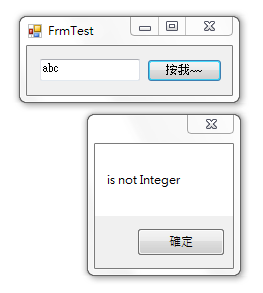
abc警告非整數

-5不合範圍

5合範圍
如此一來以後只要面對要判斷textbox.Text是否數字且在範圍內的時候
就只要使用這2個方法而不必每次都再寫一遍
以下為程式碼

using System.Text.RegularExpressions;
using System.Text;
using System.Windows.Forms;

namespace CustomClass {
    public enum pattern {
        isPositiveInteger,
        isNegativeInteger,
        isInteger,
        NonNegativeInteger,
        NonPositiveInteger
    }
    public enum startType {
        isMoreThan,
        isMoreThanOrEqualTo
    }
    public enum endType {
        isLessThan,
        isLessThanOrEqualTo
    }
    public class doVerification {
        public const string isPositiveInteger = @"^[1-9]\d*$";   //匹配正整數
        public const string isNegativeInteger = @"^-[1-9]\d*$";  //匹配負整數
        public const string isInteger = @"^-?[1-9]\d*|0$";         //匹配整數
        public const string NonNegativeInteger = @"^[1-9]\d*|0$";//匹配非負整數(正整數 + 0)
        public const string NonPositiveInteger = @"^-[1-9]\d*|0$";//匹配非正整數(負整數 + 0

        public static bool doRegex(string target, pattern pat) {
            string patternStr;
            switch (pat) {
                case pattern.isPositiveInteger:
                    patternStr = isPositiveInteger;
                    break;
                case pattern.isNegativeInteger:
                    patternStr = isNegativeInteger;
                    break;
                case pattern.isInteger:
                    patternStr = isInteger;
                    break;
                case pattern.NonNegativeInteger:
                    patternStr = NonNegativeInteger;
                    break;
                case pattern.NonPositiveInteger:
                    patternStr = NonPositiveInteger;
                    break;
                default:
                    patternStr = isInteger;
                    break;
            }
            Regex regex = new Regex(patternStr);
            return regex.IsMatch(target);
        }

        public static bool doRange(string target, int start, startType st, int end, endType et) {
            if (st == startType.isMoreThanOrEqualTo && et == endType.isLessThanOrEqualTo) {
                if (int.Parse(target) >= start && int.Parse(target) <= end) {
                    return true;
                } else {
                    return false;
                }
            }
            if (st == startType.isMoreThan && et == endType.isLessThan) {
                if (int.Parse(target) > start && int.Parse(target) < end) {
                    return true;
                } else {
                    return false;
                }
            }
            if (st == startType.isMoreThanOrEqualTo && et == endType.isLessThan) {
                if (int.Parse(target) >= start && int.Parse(target) < end) {
                    return true;
                } else {
                    return false;
                }
            }
            if (st == startType.isMoreThan && et == endType.isLessThanOrEqualTo) {
                if (int.Parse(target) > start && int.Parse(target) <= end) {
                    return true;
                } else {
                    return false;
                }
            }
            return false;
        }
    }
}

using System;
using System.Collections.Generic;
using System.ComponentModel;
using System.Data;
using System.Drawing;
using System.Linq;
using System.Text;
using System.Windows.Forms;
using CustomClass;            //引用自訂類別

namespace MyHomework._0102 {
    public partial class FrmTest : Form {
        public FrmTest() {
            InitializeComponent();
        }

        private void button1_Click(object sender, EventArgs e) {
            int start = 0;
            int end = 10;
            bool isPositiveInteger = doVerification.doRegex(textBox1.Text, pattern.isInteger);

            if (isPositiveInteger) {
                if (doVerification.doRange(textBox1.Text, start, startType.isMoreThanOrEqualTo, end, endType.isLessThanOrEqualTo)) {
                    MessageBox.Show(string.Format("{0} < {1} <= {2} 為 True", start, textBox1.Text, end));
                } else {
                    MessageBox.Show(string.Format("{0} < {1} <= {2} 為 False", start, textBox1.Text, end));
                }
            } else {
                MessageBox.Show("is not Integer");
            }
        }
    }
}

演算法升級
玩到天荒地老
using System;
using System.Collections.Generic;
using System.ComponentModel;
using System.Data;
using System.Drawing;
using System.Linq;
using System.Text;
using System.Windows.Forms;

namespace MyHomework._1229 {
    public partial class FrmGameV3 : Form {
        int allIndex;
        int btnSize;
        int btnSpacing;
        public FrmGameV3() {
            InitializeComponent();

            btnSize = int.Parse(textBox1.Text);
            btnSpacing = int.Parse(textBox2.Text);
            allIndex = int.Parse(textBox3.Text) - 1;

            for (int i = 0; i <= allIndex; i++) {
                for (int j = 0; j <= allIndex; j++) {
                    Button btn = new Button();
                    btn.Click += new EventHandler(btn_Click);
                    btn.Font = new System.Drawing.Font("微軟正黑體", 16.2F, FontStyle.Regular, GraphicsUnit.Point, ((byte)(136)));
                    btn.Location = new System.Drawing.Point(20 + (j * (btnSize + btnSpacing)), 80 + (i * (btnSize + btnSpacing)));
                    btn.Name = "btn" + i + j;
                    btn.Size = new System.Drawing.Size(btnSize, btnSize);
                    btn.TabIndex = int.Parse((i + "" + j));
                    btn.UseVisualStyleBackColor = true;
                    this.Controls.Add(btn);
                }
            }
        }

        void btn_Click(object sender, EventArgs e) {
            if (((Button)sender).Text == "") {
                string who = b ? "X" : "O";
                ((Button)sender).Text = who;
                ((Button)sender).ForeColor = b ? Color.Blue : Color.Green;

                int y = int.Parse(((Button)sender).Name.Substring(3, 1));
                int x = int.Parse(((Button)sender).Name.Substring(4, 1));
                //MessageBox.Show(x + "" + y);
                win = false;
                for (int part = 1; part <= 4; part++) {
                    int count = 0;
                    for (int i = 0; i <= allIndex; i++) {
                        Button btn;
                        switch (part) {
                            case 1:
                                btn = (Button)Controls.Find("btn" + y + i, true)[0];
                                break;
                            case 2:
                                btn = (Button)Controls.Find("btn" + i + x, true)[0];
                                break;
                            case 3:
                                btn = (Button)Controls.Find("btn" + i + i, true)[0];
                                break;
                            case 4:
                                btn = (Button)Controls.Find("btn" + i + (allIndex - i), true)[0];
                                break;
                            default:
                                btn = null;
                                break;
                        }
                        if (btn.Text == who && btn != null) count++;
                    }
                    if (count == (allIndex + 1)) {
                        win = true;
                        break;
                    }
                }
                if (win) {
                    MessageBox.Show(who + "贏");
                    doClear();
                }
                if (doCheckTie()) {
                    MessageBox.Show("平手");
                    doClear();
                }
                b = !b;
            }
        }

        //檢查平平手
        private bool doCheckTie() {
            bool ckSpace = false;
            for (int i = 0; i <= allIndex; i++) {
                for (int j = 0; j <= allIndex; j++) {
                    Button btn = (Button)Controls.Find("btn" + i + j, true)[0];
                    if (btn.Text == "") ckSpace = true;
                }
            }
            if (ckSpace) {
                return false; //有空字串沒平手
            } else {
                return true; //沒空字串平手
            }
        }
        //美送勝阿
        private void buttonclear_Click(object sender, EventArgs e) {
            doClear();
        }
        //清空
        private void doClear() {

            for (int i = 0; i <= allIndex; i++) {
                for (int j = 0; j <= allIndex; j++) {
                    Button btn = (Button)Controls.Find("btn" + i + j, true)[0];
                    btn.Text = "";
                    btn.BackColor = SystemColors.Control;
                    btn.UseVisualStyleBackColor = true;
                }
            }
        }
        private bool b; //OX旗標
        private bool win;//是否贏

        private void button1_Click(object sender, EventArgs e) {
            for (int i = 0; i <= allIndex; i++) {
                for (int j = 0; j <= allIndex; j++) {
                    Button btn = (Button)Controls.Find("btn" + i + j, true)[0];
                    this.Controls.Remove(btn);
                }
            }

            btnSize = int.Parse(textBox1.Text);
            btnSpacing = int.Parse(textBox2.Text);
            allIndex = int.Parse(textBox3.Text) - 1;

            for (int i = 0; i <= allIndex; i++) {
                for (int j = 0; j <= allIndex; j++) {
                    Button btn = new Button();
                    btn.Click += new EventHandler(btn_Click);
                    btn.Font = new System.Drawing.Font("微軟正黑體", 16.2F, FontStyle.Regular, GraphicsUnit.Point, ((byte)(136)));
                    btn.Location = new System.Drawing.Point(20 + (j * (btnSize + btnSpacing)), 80 + (i * (btnSize + btnSpacing)));
                    btn.Name = "btn" + i + j;
                    btn.Size = new System.Drawing.Size(btnSize, btnSize);
                    btn.TabIndex = int.Parse((i + "" + j));
                    btn.UseVisualStyleBackColor = true;
                    this.Controls.Add(btn);
                }
            }
        }
    }
}
